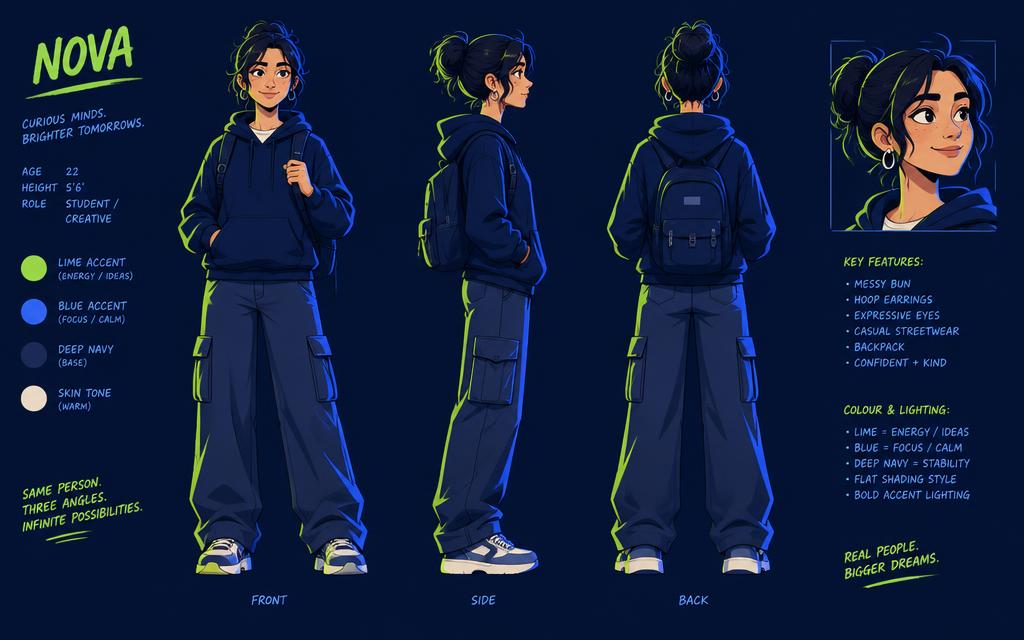
Cartoon stories fail on one thing more than any other: the main character looks different in every scene. Fix that and the rest of the workflow is straightforward.
What you'll learn
- How to write a character description you reuse
- How to break a story into scenes
- How to narrate and mix the finished piece
Step 1: Write the story
In AI Script Writer, ask for a short story with a clear beginning, a problem and a resolution, told in scenes. Ask it to label each scene — you'll use those labels as your image prompts.
Step 2: Fix your character
Write a single character sentence: age, build, hair, clothing with specific colours, and one distinguishing detail. Paste it verbatim into every image prompt. Do the same for your style sentence.
Generate a character sheet first — the same character from three angles — before you generate a single scene.
Step 3: Generate the scenes
One image per story beat in Text to Image. Where a scene is close but the pose or background is wrong, fix it in AI Image Editor rather than rolling the dice again.
Step 4: Narrate and mix
Narrate scene by scene in Generate Voice, then assemble in AI Audio Studio with a light music bed. Leave a real pause between scenes — silence is what tells a listener the scene changed.
Common mistakes
- Describing the character loosely, so they age and change clothes mid-story
- Too many scenes — eight strong beats beat twenty weak ones
- No pause between scenes, so the story runs together
Create your next cartoon story with 7LabsAI.
Start Creating